Running GitHub Actions on Your Desk Instead of Renting Compute
Like my posts? Found something useful? Saved you some time? Buy me a coffee
I had a MacBook Pro M1 and a Raspberry Pi 4B sitting on my desk doing nothing. I also had a GitHub Actions bill I didn’t want. Small bill. Annoying bill. The kind that makes you think “I have perfectly good compute right here.”
So I stopped renting and started running self-hosted GitHub Actions runners on desk hardware. Spare kit, Docker containers, zero monthly cost. Here’s how it went.
What GitHub Actions Actually Costs You
GitHub gives you 2,000 free minutes per month on the Free plan for private repos. Pro gets you 3,000. Sounds generous until you’re actually building things. A standard ubuntu-latest runner (Linux 2-core) costs $0.006 per minute once you exceed that allowance. As of January 2026, GitHub reduced hosted runner prices by up to 39%, and these figures already reflect the new rates.
2,000 minutes vanishes fast. A basic lint, build, test cycle taking 5 minutes per PR, across a handful of PRs a day, burns through it in a week or two. Collaborate with even one other person on a private repo and you’ll blow past it in days.
At roughly 10,000 minutes per month, around 5x the free tier, the maths is simple: 8,000 overage minutes at $0.006 puts you at **$48 per month**. That’s $576 a year. For CI. On a personal or small team project.
| Monthly Minutes | Free Tier | Overage | Monthly Cost |
|---|---|---|---|
| 2,000 | 2,000 | 0 | $0 |
| 4,000 | 2,000 | 2,000 | $12 |
| 6,000 | 2,000 | 4,000 | $24 |
| 10,000 | 2,000 | 8,000 | $48 |
| 15,000 | 2,000 | 13,000 | $78 |
| 20,000 | 2,000 | 18,000 | $108 |
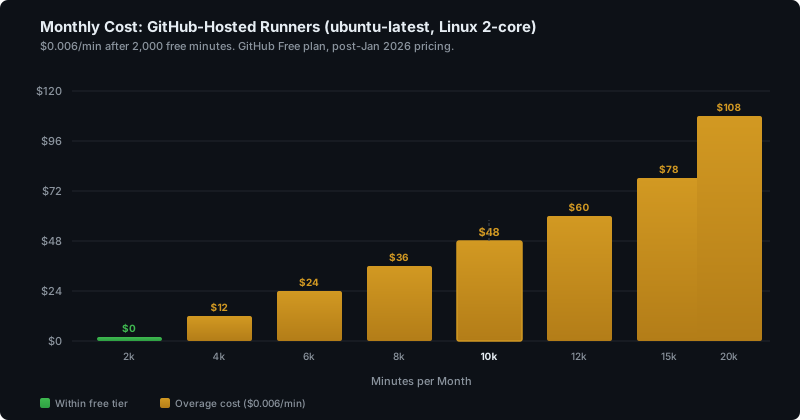
Those are Linux 2-core rates only. Windows and macOS hosted runners cost substantially more. And this is a single user scenario. Multiple contributors on private repos, multiple repos, any kind of active development cadence, and that free tier is gone before the month is half over.
The Self-Hosted Runner Pricing Saga
Quick context on the current state. In December 2025, GitHub announced a $0.002 per minute “Actions cloud platform” charge for self-hosted runners on private repos, effective March 2026. The community response was immediate and hostile. GitHub walked it back within a week, admitting they “missed the mark” and shelving the charge indefinitely.
As of February 2026, self-hosted runners on private repos cost nothing. No per-minute fee, no platform charge. You supply the hardware, GitHub orchestrates the jobs, everyone moves on. Public repos remain free regardless of runner type.
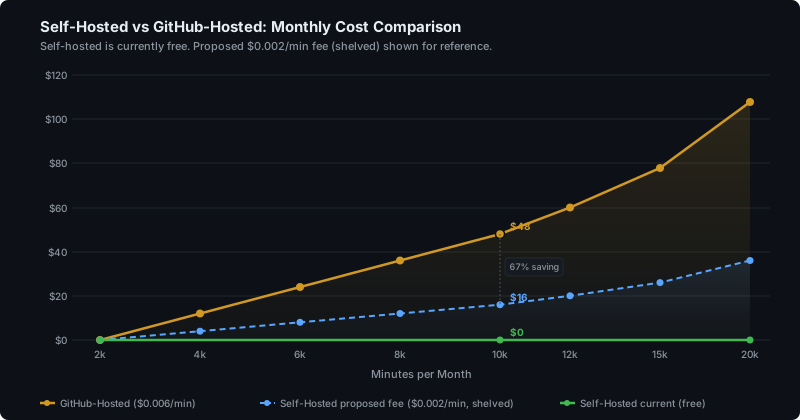
The fee will almost certainly return in some form. GitHub has real costs running the Actions control plane and they’ve made it clear they want to recover them. When it does come back, even at $0.002/min with the free tier applying, it's still dramatically cheaper than hosted runners. At 10,000 minutes, that's $16 versus $48. But for now, it’s zero.
The Setup
Two machines. Two different approaches. I wanted to try both.
MacBook Pro M1 16GB: running the GitHub Actions runner Docker container directly on the host via Docker Desktop. A linux/arm64 container on darwin/arm64. Straightforward docker run with the myoung34/github-runner image, a PAT, and the repo URL. Nothing fancy.
docker run -d --restart always \
  --name github-runner \
  -e RUNNER_NAME="mbp-m1-runner" \
  -e RUNNER_SCOPE="repo" \
  -e REPO_URL="https://github.com/your-org/your-repo" \
  -e ACCESS_TOKEN="ghp_your_token" \
  -e LABELS="self-hosted,linux,ARM64" \
  -e RUNNER_WORKDIR="/tmp/runner/work" \
  -v /var/run/docker.sock:/var/run/docker.sock \
  myoung34/github-runner:latest
Raspberry Pi 4B 8GB: joined as a worker node to a k3s cluster anchored on my desktop. The runner is deployed as a pod, managed through manifests. This is arguably the better long-term approach. Scalable, manageable from a single control plane on the desktop, and you treat runners as disposable workloads rather than snowflakes. I’ll likely move the MBP over to the k3s approach at some point.
I will add the configuration of github-runner deployment on k3s here later this week.
Both hosts run a single runner each, with generous resource allocation: 8GB+ RAM, 3 vCPUs dedicated to the runner process.
Lessons From Running CI on Desk Hardware
Cross-arch builds will find your sins. My projects build on linux/amd64 on my desktop. Running CI on a linux/arm64 container sitting on darwin/arm64 hardware is a genuine stress test of whether your code is actually architecture-agnostic. I found issues in test mocks that included hardcoded path separators only valid on macOS. Fixtures that assumed x86 conventions. These were real bugs hiding in plain sight. The cross-arch CI flushed them out before production did. Not what I set out to test, but possibly the most valuable outcome of the whole project.
The Raspberry Pi 4B is not a CI machine. I’ll be blunt. The Pi 4B 8GB is painfully, uselessly slow for anything beyond the most trivial workflows. A basic npm install && npm test on a modest Node project takes an age. Anything involving compilation, Docker image builds, or a test suite of any substance is simply not feasible. The Cortex-A72 cores and limited memory bandwidth cannot keep up. It was a fun experiment and it confirmed what I suspected: the Pi 4B is a networking appliance, not a build server.
Concurrency of one shapes everything. With a single runner per host, jobs queue and run sequentially. Three workflows triggered by a push? They run one after another. This is fine if your CI is a series of small, fast jobs. Lint in 30 seconds, build in 90, test in 3 minutes. Provided the test suite isn’t large, it works. But if you’re used to parallel matrix builds or sharded test execution, a single runner will frustrate you. This is the primary constraint, not speed.
Hardware Costs and the Payback Maths
If you don’t have spare kit lying around, here’s what purpose-built hardware looks like:
| Hardware | Approx. Cost | RAM | CPU |
|---|---|---|---|
| Raspberry Pi 5 16GB | ~$120 / £115 | 16GB | Quad Cortex-A76 2.4GHz |
| Budget mini PC (Geekom A5, Beelink EQR6) | $250–350 / £200–300 | 16–32GB | AMD Ryzen 5/7 |
| Mid-range mini PC (GMKtec K12, Geekom IT13) | $400–550 / £350–500 | 32GB | Ryzen 7 / Core i9 |
Electricity is the only recurring cost. At UK rates of roughly 28p/kWh, a mini PC drawing an average of 30W costs about £6/month. A Raspberry Pi 5 at around 6W costs about £1.20/month.
At 10,000 build minutes per month on GitHub-hosted runners, you’re spending $48/month. Against that:
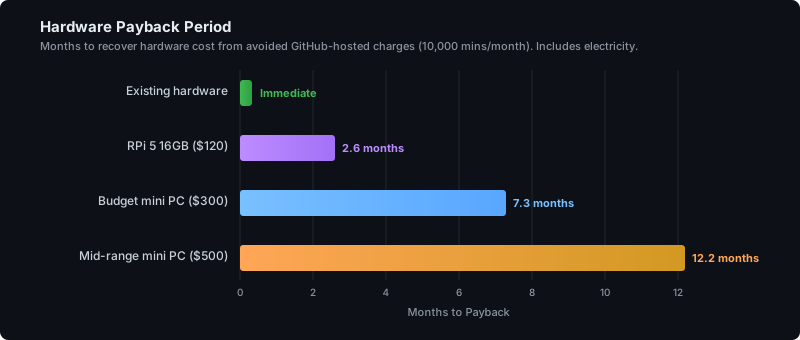
A **$300 budget mini PC** pays for itself in roughly 7 months including electricity, then saves you around $490 per year from that point forward. A Raspberry Pi 5 16GB at $120 pays back in under 3 months. And if you’re using old hardware you already own, there’s nothing to pay back. It’s immediate.
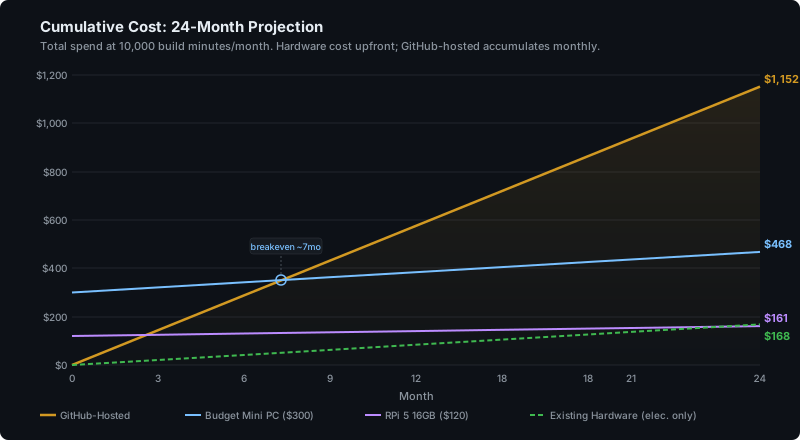
Over 24 months, GitHub-hosted runners cost you $1,152. A budget mini PC costs $468 total (hardware plus electricity). Existing hardware costs roughly $168 in electricity. The gap only widens with time.
These machines don’t stop being useful after payback either. They’re permanent compute on your desk. A homelab node, a local dev environment, something to run local AI models on. The mini PC category has got genuinely good, with AMD Ryzen chips delivering real performance in tiny form factors.
What’s Next
The Pi 4B is going back to lighter duties. I’m looking at picking up either a Raspberry Pi 5 16GB or a capable mini desktop to add to the runner pool. More hosts means actual concurrency and parallel workflow execution, which is the main limitation of this approach right now.
The Bigger Picture
For anyone in DevOps or platform engineering, running self-hosted GitHub Actions runners is bread and butter. I’ve operated significantly more complex implementations at work: the Actions Runner Controller (ARC) project on multi-node, multi-region Kubernetes clusters with autoscaling, ephemeral runners, and all the operational overhead that brings.
This desk setup is the opposite end of that spectrum. A Docker container on a laptop. A pod on a single-node k3s cluster. No Helm charts, no autoscaling, no ephemeral runners. Deliberately simple.
The interesting thing isn’t the technical complexity. It’s the economics. Spare hardware, already paid for, doing useful work instead of collecting dust. A one-time purchase that eliminates a recurring bill. Permanent compute versus rented compute.
Alternatives exist if desk hardware isn’t your thing. A rented VPS from Hetzner or DigitalOcean gives you a capable runner for $5-20/month. EC2, GCE, or Azure VMs work too. But the fixed-cost nature of rented resources cuts both ways: great while you’re actively building, wasteful if you slow down or stop. There’s cleanup involved. Teardown. The risk of forgetting to terminate an instance and eating a quiet bill for months. With desk hardware, an idle machine just draws a few watts and waits.
For a solo developer or small team wanting to stop feeding the meter on private repos, a box on your desk is genuinely hard to beat.
Pricing data sourced from GitHub Actions runner pricing and GitHub’s pricing changes announcement, February 2026.